
 Falk Sippach
01.09.2022
The open-source project docToolchain consists of a collection of scripts that make it easier to create and maintain technical documentation.
A Tool for Docs-as-Code
Documenting your software architecture is important, but it is sometimes neglected. This is where “Documentation as Code” comes in: developers and architects who also write code should enjoy this work more, or at least find it less tedious. The stated goal is documentation that is both better and more up to date. With this approach, documentation is treated like source code:
- Create content using lightweight text formats
- Store and version it in repositories such as Git, close to the source code
- Use lightweight tools without unnecessary context switching
- Integrate documentation into the development tools used every day
- Automate the creation of documentation artifacts with ease
- Integrate content from existing models using generators
- Edit collaboratively and include documentation in review processes
Various tools and extensions for existing build-management tools are already available to implement all these ideas. With some effort, you can assemble your own individual toolchain.
But why reinvent the wheel? docToolchain provides a ready-to-use, preconfigured collection of scripts that makes creating and maintaining technical documentation straightforward. It can also be adapted easily to your particular needs.
The project started in 2015 with a Groovy script that could export AsciiDoc content to Confluence. Since then, it has grown into a large collection of Gradle plugins and tasks. In version 1.x, docToolchain was still operated directly through the Gradle build tool. With version 2.x, available since September 2021, this integration is hidden behind a script (dtcw) that runs on all major operating systems, making installation and use much easier.
Installation
The website provides several tutorials for the initial setup and basic usage. Depending on your operating system, you need to download and make executable either a shell script (for Linux, macOS, or WSL2 on Windows), a PowerShell script, or a batch file (both for Windows).
cd <doc-project>
curl -Lo dtcw doctoolchain.github.io/dtcw
chmod +x dtcw
Dieses Skript könnt ihr direkt im Root-Verzeichnis des Dokumentationsprojekts ablegen und dort aufrufen. Bei der ersten Ausführung werden einige Voraussetzungen geprüft und ggf. Teile nachinstalliert (z. B. Gradle und docToolchain selbst). Voraussetzung ist, dass Java (aktuell JDK 11 empfohlen) vorher installiert wurde. Ist auf dem Rechner der Docker-Daemon vorhanden, wird docToolchain sogar ohne jegliche Eingriffe in das lokale System direkt in einem Docker-Container ausgeführt. Durch den Kommandozeilenparameter “–local” kann aber die lokale Nutzung erzwungen werden.
You can place this script directly in the root directory of your documentation project and run it from there. On its first execution, it checks several prerequisites and installs missing components if necessary, such as Gradle and docToolchain itself. Java must already be installed; at the time of writing, JDK 11 is recommended. If a Docker daemon is available on the machine, docToolchain can even run directly in a Docker container without modifying the local system. You can force local execution (without Docker) by passing the --local command-line option.
docToolchain Wrapper (dtcw)
The most important commands for starting a new documentation project with docToolchain are:
| Task | Description |
|---|---|
./dtcw tasks --group=doctoolchain |
Display all available tasks |
./dtcw downloadTemplate |
Download and set up the arc42-template |
./dtcw generateHTML |
Generate single-page HTML output |
./dtcw generatePDF |
Generate PDF output with a table of contents |
./dtcw generateSite |
Generate a complete static microsite with jBake |
A project initially created with downloadTemplate looks like this:
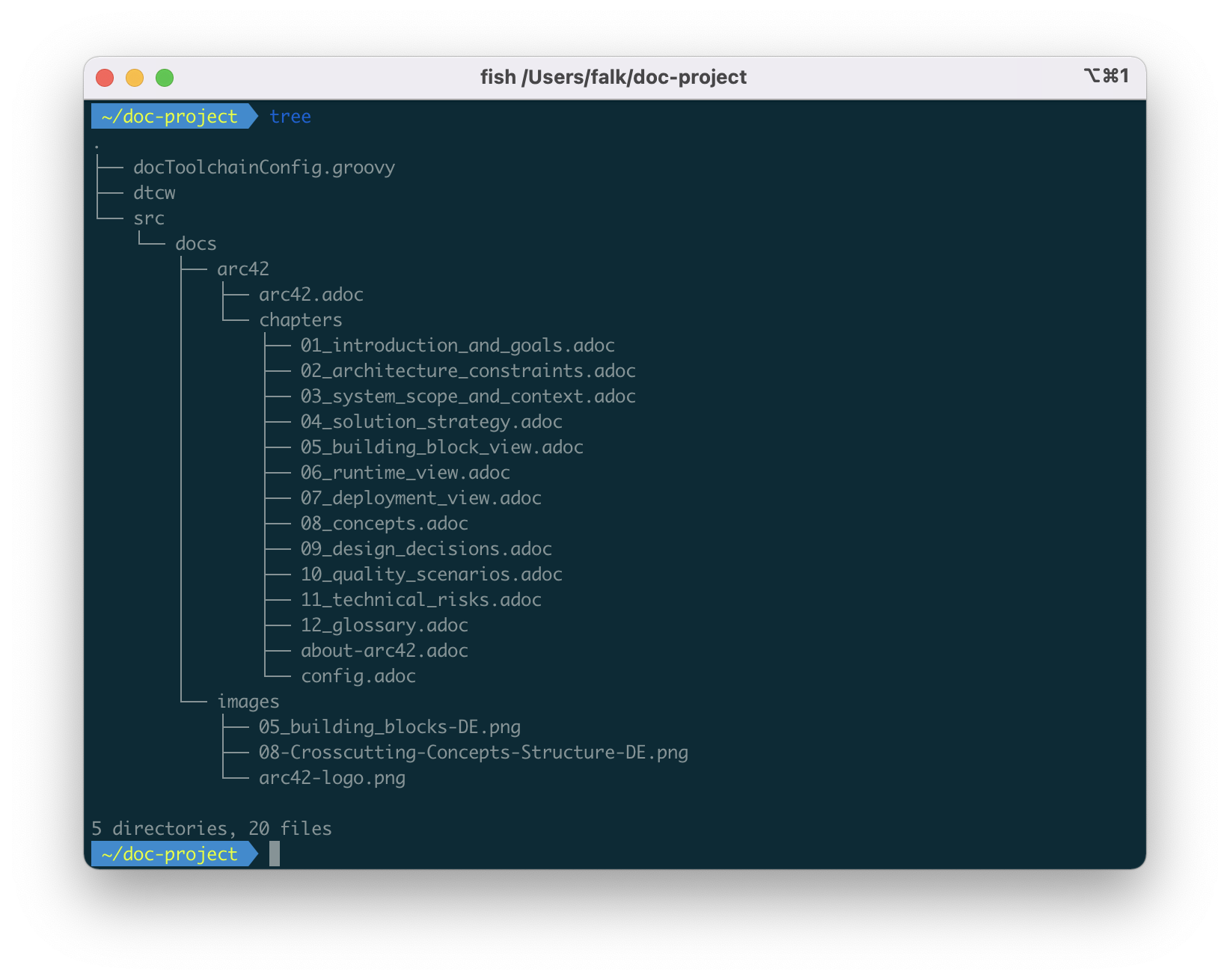
The src/docs/arc42 subdirectory contains a number of AsciiDoc files, one for each chapter of the arc42 documentation template. You can adapt this structure as needed and extend it with additional documents. By default, docToolchain uses the AsciiDoc format with the Asciidoctor processor because, compared with Markdown, it already provides many required features such as tables, includes, and a table of contents out of the box. But you can also use docToolchain with Markdown documents. Diagrams can be included either as binary files such as JPG or PNG, or through text-based formats such as PlantUML and Mermaid.js following the Diagrams-as-Code approach. Extensive plugins for development environments such as IntelliJ IDEA, Visual Studio Code, and Eclipse provide rendering, previews, embedded diagrams, and more. This lets you edit the files in your familiar environment and avoids unnecessary context switches to other WYSIWYG tools such as Word, Visio, or PowerPoint.
You can adapt the generated output to your corporate identity, including logos, styling, and fonts. The results are written to the build subdirectory and can be regenerated at any time. With each developer commit, a build server such as Jenkins can rebuild the documentation alongside compiling the source code and running the tests, and then publish it to a central location. This avoids sending documents such as Word files and PDFs separately by email. A link to the published location is sufficient, and readers can view or download the latest version at any time.
Typical Workflow
Because Docs-as-Code keeps documentation close to the source code and stores it in lightweight text documents, it can be integrated easily into everyday development work. Avoid unnecessary redundancy by generating parts of the documentation directly from existing information such as database models, source code, and UML diagrams, and keep them up to date. For example, source code can be referenced conveniently from AsciiDoc files. Changes to that code are included automatically the next time the documentation is built.
docToolchain already provides many predefined input interfaces. For example, you can export content from Excel spreadsheets as CSV or even directly as AsciiDoc, then import it into existing documents. One possible use case is a business department maintaining and regularly updating acceptance criteria for user stories in an Excel spreadsheet. Formatting information such as column widths, column and row spans, and colors can also be transferred. The corresponding task is called exportExcel.
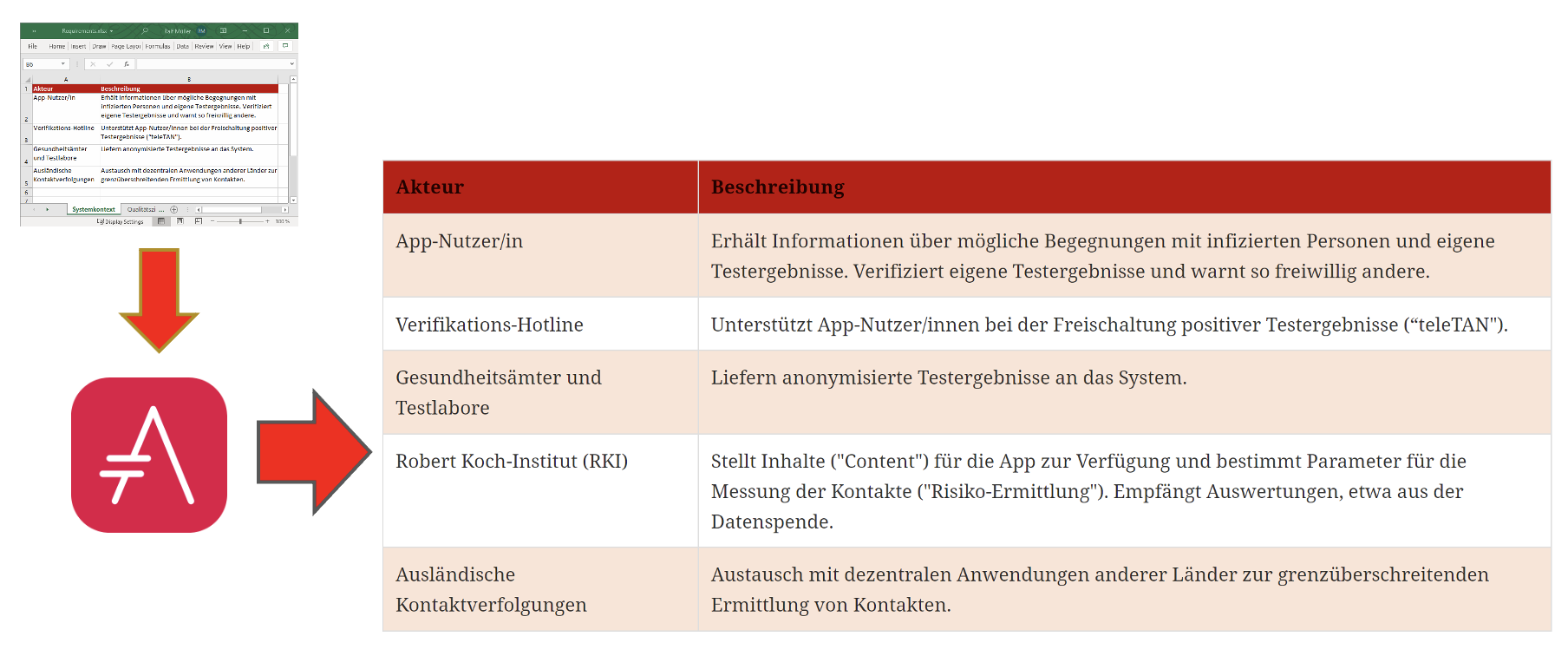
Existing Visio or PowerPoint content can be exported efficiently as images and referenced from AsciiDoc documents. When the original files change, updated images are generated without any additional manual effort.
Exporting information from the Enterprise Architect UML modeling tool is equally straightforward. You can extract the various diagrams as image files and the notes as text, then embed both in existing AsciiDoc files. This allows you to include existing building-block views such as component diagrams or runtime views such as sequence diagrams and supplement them with tabular descriptions of the individual elements. The same principle applies here: when the original changes, rebuilding the documentation artifacts updates the published content automatically.
Other input sources include:
- Jira, for example completed tasks for release notes
- Git repositories for
exportChangeLogandexportContributors - OpenAPI interface descriptions
The following overview lists the various input formats on the left-hand side.
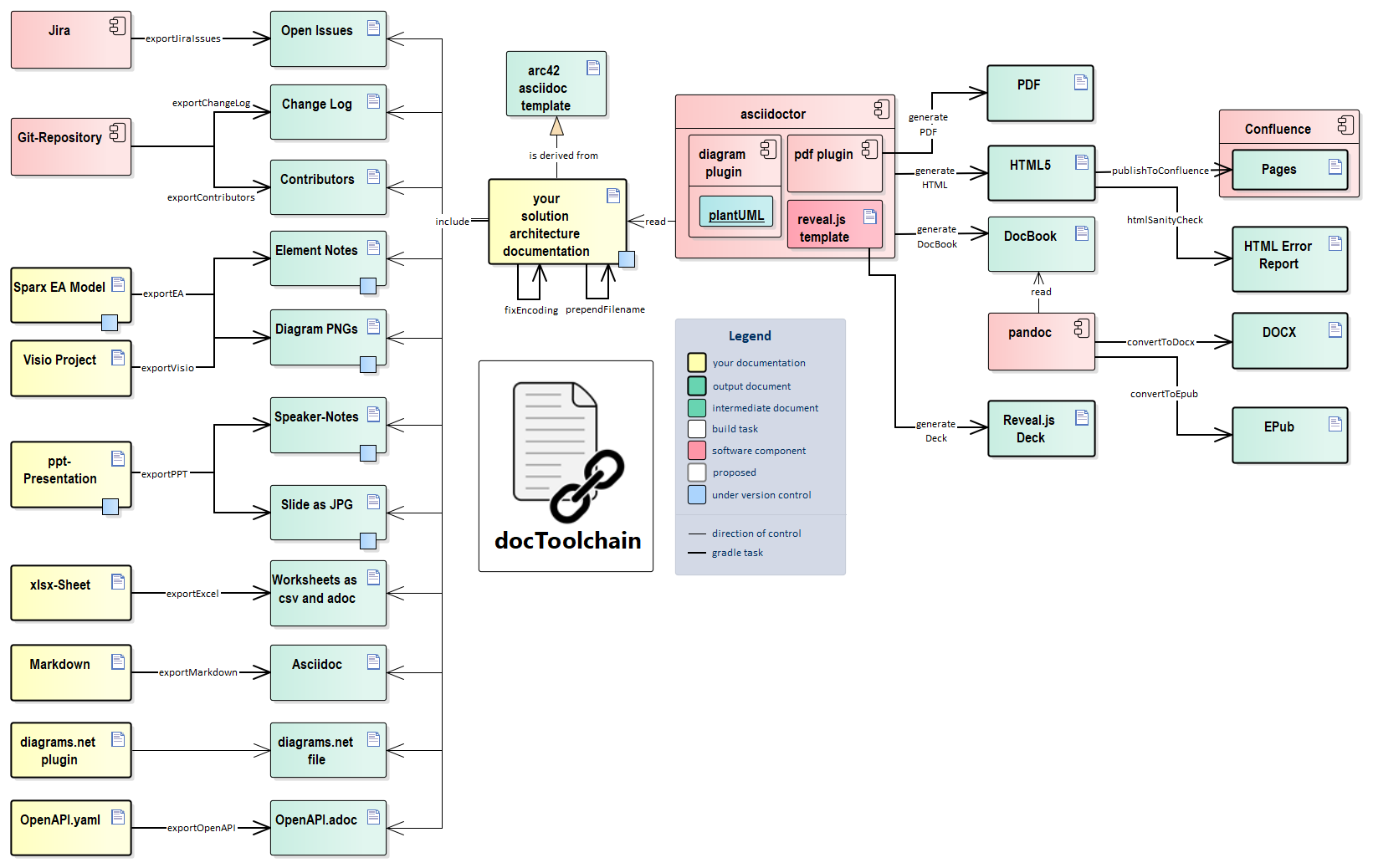
Output Formats
The overview picture also shows the different options docToolchain provides for generating documentation results. In addition to the standard formats HTML and PDF, the DocBook format can be used to create Word documents or EPUB files, and even presentations built with Reveal.js. The standout feature among the output formats is the publishToConfluence task. Confluence has become almost indispensable in many IT departments. The commercial wiki from Atlassian has developed into a de facto standard. It is also frequently used to create and maintain technical documentation. One advantage is that it enables collaboration on Confluence pages with colleagues who do not have a technical background, for example subject-matter experts from the business. Although Confluence provides good structuring options and a capable search function, important information is often difficult to find. There is a fitting quote: “The wiki is where documents go to die.”
The task publishToConfluence brings both worlds together. Developers and architects write documentation in lightweight text and graphics formats following the Docs-as-Code approach. Exporting the results to Confluence gives other groups direct read access. The wiki’s commenting feature can be used to provide feedback during review processes. Changes in Confluence are made exclusively through comments; direct edits are overwritten by the next export.
Outlook
In recent years, docToolchain has become a popular tool in the Documentation-as-Code ecosystem. In version 1.x, its close connection to the Gradle build-management tool was still clearly visible. The wrapper now decouples users from Gradle on the command line, and Gradle is intended to disappear from docToolchain entirely in the future. Because it already operates invisibly under the hood, there is no reason not to use docToolchain with other tools such as Maven or in entirely different environments outside the Java ecosystem.
Version 2.x introduced more than just the wrapper. You can also run docToolchain in a prepared Docker container, avoiding the effort of installing the required dependencies locally. The automatic installation of the arc42 template makes it easier to start a new documentation project. In addition, jBake, a Java-based static-site generator, was integrated to create microsites that can serve, for example, as an entry point to an architecture overview. Their design and layout can also be adapted flexibly to your organization’s requirements and your own preferences.
The open-source project, led by Ralf D. Müller, continues to evolve. Around 50 committers have already contributed. Some of the available export and generation tasks were provided by the community. Considerable effort is currently also being invested in improving the documentation and creating tutorials. Cryptic error messages caused by the Gradle foundation have now been supplemented with specific guidance, making it easier to diagnose problems.
You can now adapt existing local scripts more easily or implement new tasks. Previous knowledge of the Groovy programming language is helpful. When you implement a new import or export, you can also contribute it to the docToolchain project. If you have questions, the consistently friendly community provides knowledgeable and timely support.
Interested in Learning More? Take a Look at Our Training:
Documentation-as-Code training at socreatory